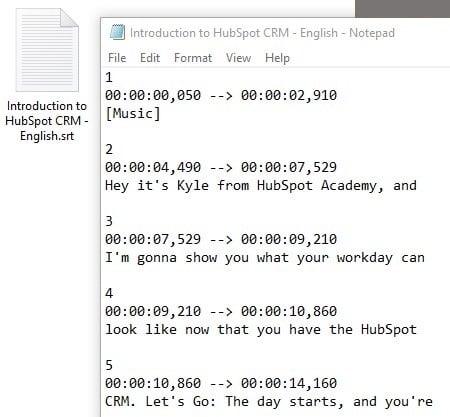
Nowadays, subtitles are becoming increasingly common, particularly as businesses expand their marketing efforts and aim to achieve a broader, global market. Additionally, subtitles are often necessary to ensure your video and audio files are every bit inclusive as possible. Fortunately, at that place's an easy solution to adding subtitles to video -- an SRT file. To ensure your videos are inclusive and easily digestible for whatever audience, it's critical you include an selection to picket with subtitles. Here, we'll explain what an SRT file is, and how to create and edit one for your marketing videos moving forward. An SRT file (otherwise known as a SubRip Subtitle file) is a plain-text file that contains disquisitional information regarding subtitles, including the start and terminate timecodes of your text to ensure your subtitles lucifer your sound, and the sequential number of subtitles. It'due south of import to annotation, an SRT file is but a text file yous would use alongside video or audio -- it does not also include the video or audio you lot're subtitling. SRT files tin can be created from scratch or downloaded and edited. Before nosotros get into the basics of editing SRT files, let's have a look at what an SRT file looks like and how it's formatted. Generally, Wordpad or Notepad are the easiest programs to open up SRT files with because you can view them in plainly text. However, you can also utilize software specific to SRT files such every bit Subtitle Workshop (more on this subsequently). In society for an SRT file to work in conjunction with the video or audio file it's paired with, it must follow a specific format consisting of: The timestamp is formatted like so with the milliseconds rounded to 3 decimal points: Hours:Minutes:Seconds,Milliseconds The timeframe is formatted like and then with an pointer denoting range: [First Timestamp] --> [Second Timestamp] The arrow must consist of two hyphens and a correct-pointing angle bracket (also known as the greater-than sign or carrot). If yous're creating 1 from scratch, feel costless to copy and paste this sample SRT formatting: Instance SRT Formatting 1 00:00:00,000 --> 00:00:00,000 [Insert your first line of text here, and don't forget to modify the timestamps.] 2 00:00:00,000 --> 00:00:00,000 [Insert your second line of text here, and don't forget to change the timestamps.] If you notice your subtitles don't marshal with your audio, or you need to modify the phrasing, it's easy plenty to edit your SRT file. Consider using Subtitle Workshop or some other subtitle editor of your choice. Alternatively, if you lot don't want to download an editor, you tin can open your SRT file in Notepad. Yous can modify the fourth dimension and phrases within the file, but don't alter the punctuation. Then, click "File" → "Save equally", and choose the SRT file extension. Captions are one element that you can include in your video marketing strategy that makes your content more inclusive and valuable to your audience. Editor's note: This mail was originally published in December 2018 and has been updated for comprehensiveness. 
What is an SRT File?
How to Create an SRT File
SRT File Case
How to Edit an SRT File


Originally published Feb iv, 2021 7:00:00 AM, updated February 04 2021
DOWNLOAD HERE
Posted by: martinforepher.blogspot.com


0 Comments